
Creating an e-shop is definitely not a simple matter. However, the solutions available today offer a relatively quick possibility of creating a basic e-shop system, into which only products need to be uploaded laboriously. However, it is very important to make the right choice right from the start.
PrestaShop or WooCommerce?
The article was revised and updated in May 2026. Check with specific service providers for technical information.
From the point of view of financial and time savings, today we can consider the most frequently used e-commerce solution platforms PrestaShop and WooCommerce. While PrestaShop represents a stand-alone solution with comprehensive functions, WooCommerce is "only" a plugin for the WordPress CMS system. So how to choose between them?
PrestaShop
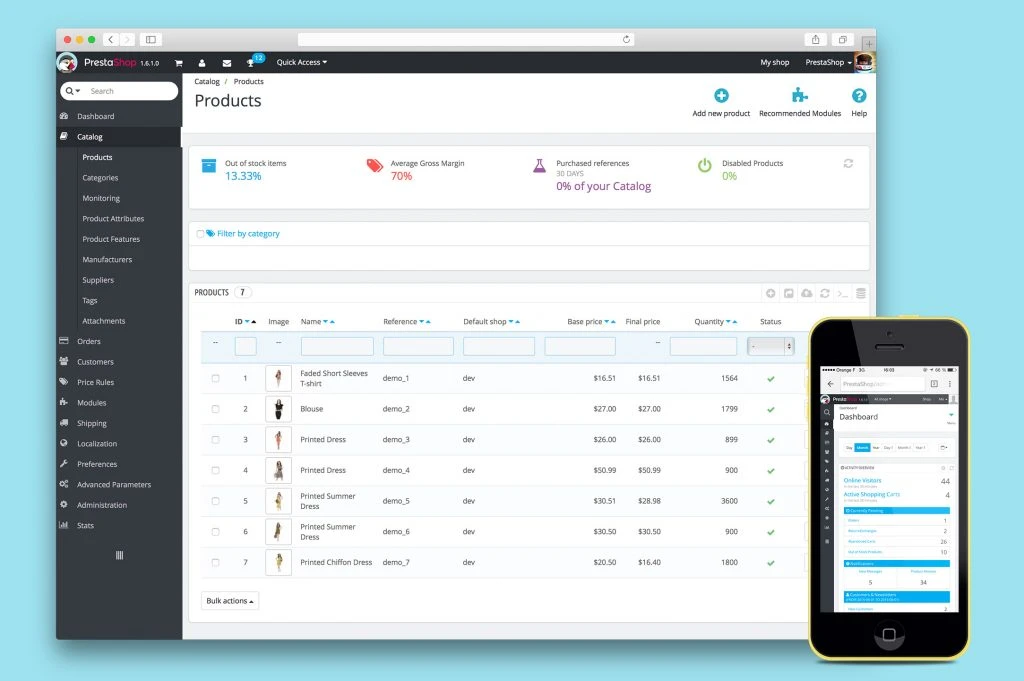
E-shop system PrestaShop we are on our blog already presented. We even brought you a separate article about what's new in the latest PrestaShop 1.7 compared to version 1.6. It is one of the most popular e-shop solutions in the world, which offers good support and a really large number of functions.
WooCommerce
WooCommerce is an e-commerce plugin for WordPress. By installing it, you will add e-shop functionality to your website. The system itself offers a huge number of functions and plugins, while its deployment on the WordPress platform ensures that its management is simple and can be managed by almost anyone.
Just like PrestaShop, WooCommerce also allows external solutions to be connected to the e-shop, for example links to social networks, various payment gateways, or other add-ons. Today, WooCommerce already has almost 34 million downloads and is by far the biggest competitor for PrestaShop.
COMPARISON | PrestaShop vs. WooCommerce
Basic principles
Prestashop represents an ecommerce platform created for medium and large companies in order to sell products online. Allows you to add static (CMS) subsites and a blog via a free module.
Woocommerce is a free WordPress plugin, created to extend the functionality with the shopping cart. Its purpose is to help larger blogs sell some of their products related to their content.
Speed and power
Prestashop
Prestashop built in a cache file system is not ideal. It slows down the website every time the user uses it. Good experiences are with Memcached. However, support from web hosting is required for this. Memcached is usually not activated on web servers. Memcached is especially useful for websites with high traffic, when it acts as a buffer between the website and the database.
Next, there is the minify code function, which is very simple, but has problems. For example In Google Analytics, moving the JS code to the bottom sometimes breaks the correct reporting.
Woocommerce
Problems can occur with W3 Total Cache, mainly related to minify codes, when the most common errors are empty pages. Minification will break CSS or JS code. The free WP Super Cache plugin and the paid WP Rocket plugin are both good choices for speeding up your Woocommerce website.
Most specialists recommend a combination of Hypercache and Better WordPress Minify plugins for websites with low and medium traffic.
Design
Themes
Prestashop
Themes are available at:
- the official website: addons.prestashop.com, where there are over 1300 themes,
- Themeforest: over 390 themes,
- Template Monster: over 1000 themes.
Woocommerce
Themes are available at:
- the official WordPress site,
- Themeforest: 430 directly for Woocommerce, 6000 customizable themes.
Implementation
Prestashop
Prestashop is built on the Smarty framework. So as long as you know a little about HTML and CSS, you can create your own design. You can read more about the Smarty syntax and variables at his official website.
Woocommerce
The Woocommerce design can be customized with the theme itself by overriding the plugin template. There is usually a "/woocommerce/" file in the theme. Here you can create your own design. Depending on the version, here are some examples of how this can be done: https://docs.woothemes.com/document/template-structure/
Warehouse management
Prestashop it has a built-in advanced warehouse management section that can help manage inventory from multiple warehouses. You can track your products using UPC or EAN codes.
Woocommerce does not provide a built-in solution for advanced inventory management. However, there are plugins that allow you to integrate well-known software such as TradeGecko or StitchLabs.
Integration
ERP
Prestashop
There is a bit of confusion about Odoo ERP (formerly known as OpenERP). Prestashop also has its own module for linking (at a price of 180 euros). It is Odoo openerp bridge. You can also integrate your own ERP using the Prestashop web service.
Woocommerce
There is a free plugin connecting Woocommerce with Odoo. As long as you use any ERP in the price of the linked plugin, it is irrelevant. The ERP price itself and the implementation costs are high enough by themselves.
Accounting software
Prestashop has around 50 accounting and invoicing modules on the official add-ons website.
For Woocommerce again there is approx 13 accounting plugins.
Sending shipments
Prestashop
It uses useful shipping options built into the back-office, such as:
- own prices according to the address, weight and size of the package,
- own prices for different groups of customers,
- defining and distributing couriers.
If you want to expand these options, there are more than 180 modules for shipping and logistics in the official add-on market. Also, many couriers have developed their own module for Prestashop.
Woocommerce
There are over 40 official shipping extensions available.
Payment gateways
Prestashop has over 150 official extensions including PayPal, HiPay, Skrill, Autorize.net, pos payment modules and more.
Woocommerce has over 140 official extensions including Authorize.net, Stripe, Amazon Payments, Paypal, etc.
On-site marketing
Automated discounts
Prestashop
There is a "price rules" section. However, you do not have more advanced options to offer the product for free if the total order is greater than a predefined amount, or if the customer buys more predefined items.
Example #1: buy 3 products, get 1 free (doesn't work)
Example #2: if the total order is more than 100 euros, you will get 1 additional product for free (also not working)
Woocommerce
There is a Dynamic Pricing plugin that enables dynamic pricing and costs $129 (approximately €109.51). A cheaper version is also available at codecanyon for 26 dollars (approximately 22.07 euros).
Product reviews
Prestashop
You can set preferences and moderate ratings using the Product Comments module. However, if you want more interactive and active reviews, you can try the Yotpo module. There is also a free version available, but it uses the logo.
Woocommerce
It uses the comment system from WordPress with the possibility of additional rating with stars. If you want to list ratings by category, you can try the module Woocommerce Category Rating. It calculates the average rating of the products and adds them to the subpage category in the format from Schema.org. It's useful from an SEO point of view because it shows rich snippets in Google searches.
Multi-store function
Prestashop
On Prestashop, you can create multiple e-shops in the back office with a few clicks. This can be an interesting choice for some entrepreneurs, as:
- you will have a group of e-shops in the same admin,
- you can create groups of e-shops,
- you can have an e-shop with a selection of products - e.g. if you sell clothes, you can have separate e-shops for shoes or trousers, etc. while these e-shops will be simply managed from one place,
- you can have several e-shops for each country in which you operate,
- you can have your own domain or subdomain for each e-shop.
Woocommerce
Multiple websites on WordPress can be a challenge, especially if you want to have them in multiple foreign languages.
Multilingual support
Prestashop
The setup is very simple:
- you can add multiple languages in the admin,
- if you are using a theme that does not have multiple translations, you must translate the language manually,
- if you have multiple languages available, the default URL will refer you to the default language directory: yourwebsite.sk/lang/; if you want to avoid this, you can use the multistore option by creating a separate domain/subdomain for each language.
Woocommerce
There are plugins for Woocommerce, the most famous being WPML. However, it is possible that you will have multiple problems when using multiple languages. There is also a free polylang module.
Possibility to pay in several currencies
Prestashop
You can import new currencies with a click. The Location & Currency Detection module from Presto Changeo is useful for this.
Woocommerce
You can use multiple currencies using the WPML translation plugin or the Currency Converter Widget extension. There will not be multiple currencies to choose from, the customer can only choose to display the price of products in a given currency.
B2B
In Prestashop is this option available by default in base. However, the options are of course limited and you will always need a developer to edit.
For Woocommerce it is difficult to develop a B2B platform, as there is no possibility to create customer groups.
Linking products
Prestashop
There is a built-in section that works, but has a few issues. It can be slow in some cases and you will need to set the default hosting settings. Be aware of including a default category for products when exporting/importing. You will not find your products through the list or your products will lack basic elements such as breadcrumbs.
Woocommerce
Importing in Woocommerce can be done through the paid WP All Import extension. There is also an official Woocommerce extension for $139 (118 euros).
Security
Prestashop
It is necessary that you are using at least version 1.6.1.0, as earlier versions are vulnerable to exploits. There is no option to update the e-shop, but you can use the Security Patch module
Ďalším problémom v Prestashop je, že občas majú niektoré témy súbory s koncovkou .tpl dostupné pre každého. Pokiaľ nechcete, aby mal hocikto prístup k vášmu frontendu, zadajte nasledujúce pravidlá do vášho súboru .htaccess file:
It is a good idea to protect the back office with a .htaccess/.htpasswd password.
Woocommerce
Almost identical security to WordPress. Do not install nulled themes and plugins. Hackers love outdated versions of popular plugins and themes.
If you have e.g. Revolution Slider plugin installed (I believe older than 4.1.4), you are vulnerable to abuse. Someone can gain access to your credentials via URL: /wp-admin/admin-ajax.php?action=revslider_show_image&img=../wp-config.php.
Also some older versions of popular themes like Avada, Ultimatum, X Theme, The7, etc. they have the same problem.
Costs
Average cost per theme
Prestashop:
- themeforest: 60 dollars (approx. 51 euros),
- on the official website of Prestashop: 110 dollars (approximately 93 euros); if you subscribe to the newsletter, you will occasionally receive discount coupons
Woocommerce:
- Themeforest: 55 dollars (about 46 euros).
Average price per module
Prestashop:
- on codecanyon: 22 dollars (approx. 19 euros),
- on the official website: 300 dollars (approximately 254 euros).
Woocommerce:
- on codecanyon: 35 dollars (approximately 29 euros),
- on the official website of WooThemes: 110 dollars (approximately 93 euros).
Necessary resources
Prestashop it uses multiple resources, which leads to higher costs. It's not as demanding a platform as Magento, but good hosting is required.
Woocommerce it does not use any particular resource. For small and medium-sized websites, basic hosting will suffice.
Available developers
Prestashop:
- number of available freelancers on freelancer.com, elance, upwork: over 11,000,
- number of simultaneously entered tasks on these websites: over 100
Woocommerce:
- available freelancers on freelancer.com, elance, upwork: over 6,000,
- number of simultaneously entered tasks on these websites: over 400.
There are enough developers for both systems, but not that much work, so you shouldn't have a problem finding the right people.
Documentation and education
Prestashop
Prestashop's documentation is not very detailed. It's missing essential elements that can help developers and website owners fix their problems faster. The forums are full of novice users who won't help you much, although some experienced developers answer most questions.
Documentation and forums are not very SEO optimized. You will notice that it is difficult to find the right answer to the questions. Also, always check for the correct version when troubleshooting.
Woocommerce
Dokumentácia pre Woocommerce a WordPress je ukážková. Takmer každý nápad, chyba alebo plugin sa dokážu nájsť na Google prostredníctvom niekoľkých kliknutí. Všetko je zdokumentovaná na WordPress Kódexe a Woothemes docs.
Forum WordPress.org it is very active and you can quickly find answers to questions here.
Education
Prestashop
Prestashop has a series of official courses for different experience levels. However, it is really expensive (the price of the courses is 800 to 1000 dollars, in conversion 680 to 850 euros) and from many experiences it is not worth it. The entire education takes place in a two-day intensive training session led by professionals.
Woocommerce
There is no official training for Woocommerce. If you like learning through videos, you can find online courses through Udemy.com or Lynda.com.
Basic on-page SEO
Prestashop
There is no plugin to generate real-time automatic meta descriptions and titles based on topics. However, you can try the SEO manager and the codecanyon module. But every time you add a new product or category, you'll need to update it to load the latest data.
Then there is the duplication of content issues. Prestashop does not often use rel="canonical", which is not ideal from the SEO point of view. You might think that you will have multiple duplicate subpages, but this does not happen very often.
If you are using an older version of Prestashop, the general robots.txt file may block some files for CSS and JS code. From an SEO point of view, this is inappropriate and Google will try to warn you about it via Search Console.
Woocommerce
Woocommerce/WordPRess has a number of built-in on-page SEO features. You have e.g. enhanced Yoast SEO for better performance. The chance of creating duplicate content is low if you use a properly configured Yoast SEO plugin.
The URL is a 404 error
Prestashop
It uses a 301 redirect, which uses the ID from the URL. This is the basic element that it offers for the stability of the e-shop. Some modules can clean IDs from URLs, but you shouldn't do this if your primary concern is stability.
There is no need to have a basic format for product and category URLs. However, you can choose your preferred URL shape if you want.
Woocommerce
Woocommerce basically has this URL format: /product-category/ and /product/. If you want to get rid of it, you can use the Taxonomy Base Slug plugin.
For product URLs, it is recommended to use "/p/" as the base. However, if you are determined to get rid of this as well, there are premium plugins like WooCommerce URL Cleaner. However, you should be careful, as there are cases when the website slowed down after using it.
If you plan to use SEF filters and no category base, you're likely to run into a problem. WordPress also typically generates a 301 redirect when the product URL has changed, which is great for reducing 404 errors.
Website search
Prestashop
The integrated search on Prestashop is one of the best available on an open-source system. Cool features include:
- automatic title completion for photos, titles, prices and reference code for products,
- search indexing: need to set up a Cron job to update the index for fast search operation,
- priority search of Prestashop: you have the possibility to prioritize which elements are important during the search (name, description, tags, code for reference).
You can also use an external provider like Algolia or Doofinder. They are fast and intuitive, but can become expensive for high-traffic sites.
Woocommerce
You can use auto-completion with a plugin like WooCommerce Product Search. It costs $49 (approx. 42 euros). Autocomplete can become slow in some cases. It does not use the indexing system and becomes almost unusable if you have several thousand products in your e-shop. There is also no system for prioritizing search results.
Conversion value optimization
Order completion
Prestashop
The default order completion for Prestashop isn't exactly amazing. You have a choice between a 5-step process and a one-page process, which is not really a one-page process, as you have to save your details before displaying the payment and order delivery options.
There are several modules that can make the single page process better for users, e.g. Presto Changeo - One Page Checkout.
Woocommerce
Here, order completion is pretty straightforward. Usually it's in two steps (shopping cart and checkout), but you can easily put both sections on the same subpage.
Restoring abandoned carts
Prestashop
Here it can be done by sending an email. However, there are other modules like Abandoned Cart Reminder Pro.
A cheaper alternative is Abandoned Cart Alerts. To explain, let's use a situation: let's say you're logged in to your customer account via a computer, you have products in your cart, but you don't complete the order. Within two hours, you will receive an email telling you that you forgot the products in your basket. If you are e.g. logged in on your smartphone, just click on the link and you will be transferred to the shopping cart, where the added products will be displayed and you can complete your order.
Woocommerce
The solution here can be the Recover Abandoned Cart plugin.
Rewarding loyal customers
Prestashop
There is a built-in option in the customer account where you can convert loyalty points into a voucher that can be entered when completing the order. For extra functions, a paid module must be purchased.
Woocommer
There is a Woocommerce Points and Rewards extension for Woocommerce. It is an easier solution for the user, as you can sign up for a loyalty discount directly in the shopping cart.
Add/modify products
Prestashop
The Prestashop admin requires some time to set up the products. It is not possible to edit products at once in large groups from the product list. Some plugins can help with this, but they are primitive and quite expensive.
Product combinations need to be added one by one and before adding a combination (also called variations) you need to add predefined attributes from the admin. The option to adjust prices in large groups is not available by default.
Woocommerce
On Woocommerce, you can bulk edit products from a list, but you'll run into problems if you try to edit more than 100-200 products. Adding variations here is easier than with Prestashop. You don't need to add a separate subpage every time you want to add a product attribute.
We could discuss the reasons for choosing one of the mentioned solutions for a very long time. Each of these platforms offers its own advantages and disadvantages. That is also why we have prepared a clear table for you, which should tell you whether PrestaShop or WooCommerce is more suitable for your e-shop.
Verdict
If your e-shop contains only a few products (on the order of tens), you are looking for a simple solution or you have an existing WordPress website to which you want to add e-shop functionality, choose WooCommerce. But if you are looking for a more sophisticated solution that is created from the ground up for e-shops and handles more demanding requirements, try PrestaShop. Both of these platforms are available for free, so you can test them before real deployment.
Pokiaľ chcete vytvoriť nový e-shop, odporúčame vám aj náš e-commerce produkt s názvom Sellio. Radi vám však poradíme a pomôžeme aj pri tvorbe e-shopov cez PrestaShop alebo WooCommerce. Stačí, aby ste nás kontaktovali.