

The key to successful marketing is a well-executed plan. However, preparation is equally important, but often underestimated. One of these underestimated parts is information architecture.
Information architecture can be intimidating for designers who have never done it before. Creating a successful website visualization takes skill and practice along with planning. However, anyone can learn to create an information architecture that is efficient and captures data in a way that everyone can understand.
The article was revised and updated in May 2026. Check with specific service providers for technical information.
What is information architecture
Information architecture is the creation of a structure for a website, application or other project that allows us to understand how users access information on a website. The result is a site map, hierarchy, categorization, navigation or meta data.
When you start separating your content into individual categories, you are creating an information architecture. When web designer creates a sketch of the navigation menu, also creates an information architecture.
How to create the information architecture of a website
Regardless of the task at hand, there are some basic questions we must ask ourselves when creating an information architecture. They are:
- how do users navigate (click through) the website?
- how does the application help the user catalog information?
- how is the information presented back to the user?
- how does information help customers and encourage them to act?
For the right answer, you need to focus on several things:
- target group,
- functions that are used on the website,
- data presented on the website.
Next, it is necessary to choose a suitable program. You can use classic Word, Balsamiq or Lucidchart, which is featured in this image.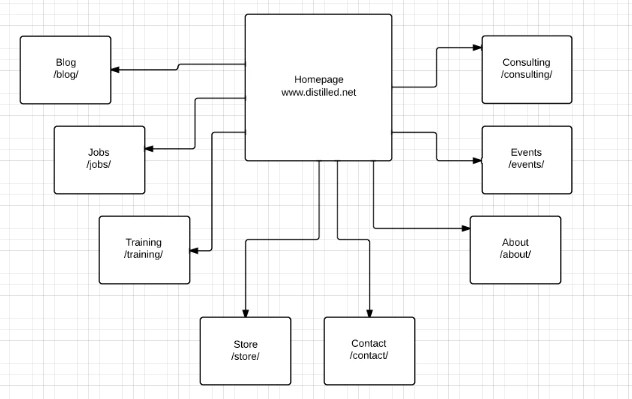
photo source: distilled.net
It is very important to visualize the differences between internal links that go up and down the hierarchy, so it is best to use distinct colors. In the diagram below, blue has been used for downlinks and red for uplinks. It is also recommended to use color for links going across the entire hierarchy. If you plan to share this map with other people, it's a good idea to include a legend for them.
photo source: distilled.net
Your information architecture map should include the following:
- hierarchical structure,
- internal links (vertical and horizontal),
- URL examples.

photo source: distilled.net
How to use your information architecture map
There are 4 different ways to use the map:
- Tracking the correlation between information architecture and measured data,
- Identifying page types,
- Identifying technical problems,
- Analysis of competition.
tracking the correlation between the information architecture and the measured data
It can often happen that you create a subpage targeting a certain keyword, but another of your subpages shows up better in the results for that keyword. Although the reason may be several factors, information architecture provides better insight into this problem.
Using this format also makes it easier to compare the contrast of two internal subpages. It is also easier to ask questions like:
- is the subpage linked from a subpage that is higher in the information architecture?
- is the subpage linked from subpages with higher PA (page authority)?
- is the subpage linked from multiple internal subpages?
identifying page types
By creating a map of the information structure, you can very easily distinguish the different types of subpages that are located on the website. In the final result, with technical SEO, you can more easily find out whether the problem is only with a specific subpage or if it concerns all similar categories.
Knowing this information is very important when communicating with the developer because it decides how you will solve the problem and shows how well you know your site and can address the problem.
A better understanding of the different types of subsites also plays a big role in the future. Rather than identifying strategies that pertain to specific subpages, it's easier to visualize larger strategies because you have a better understanding of how many different types of subpages there are on your website and how they relate to each other.
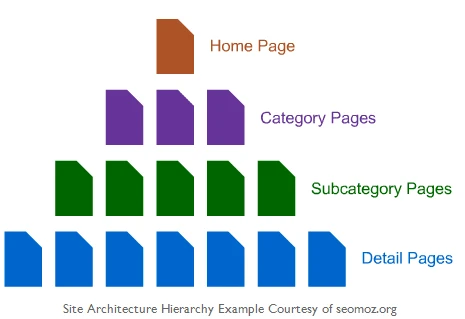
photo source: distilled.net
identifying technical problems
Using the information architecture, you will also find out the content and structure of the URL. As a result, it will be easier for you to solve technical problems and identify the reasons why they arose. It is the perfect addition to any technical audit performed.
competition analysis
In addition to creating your own information architecture, you can also create a map of your own competition or the client's competition. This is useful for identifying different types of subpages from competitors that target specific keywords and finding out why they do better in internal linking.
Resources for information architecture inspiration
Information architecture can be very complex, so it is not surprising that there are several websites dedicated to this topic. The sites below range from individual information architects who share their resources with colleagues to professional organizations who make a living out of it.
Info Design Patterns
Info Design Patterns deals with news and provides a database on information architecture. A database is particularly suitable for people who decide how they want to display data to their users or readers.
photo source: noupe.com
InfoDesign
InfoDesign is a great resource for anyone interested in information architecture. This site has hundreds of articles that are divided into categories such as accessibility, content strategy, interaction design, prototypes, and the like.
photo source: noupe.com
Information Design Watch
Information Design Watch offers a newsletter and classic articles with information about design around the world. It includes many great, worldwide resources of infographics and information structure designs and is a great resource for people looking for inspiration.
photo source: noupe.com
Design Crux – Information Design
Information Design by Design Crux has articles on information architecture and design. Both are great sources of inspirational examples.
photo source: noupe.com
Cool Infographics
Cool Infographics is a blog that collects interesting infographics from all over the web. It's a premier resource for finding inspiration and examples of great infographics and information architecture.
photo source: noupe.com
JJG.net
JJG.net offers resources for experience design and information architecture. This includes PDF articles or interviews.
photo source: noupe.com
Information Architecture by A List Apart
A List Apart has an excellent category on information architecture with more than 20 articles.
photo source: noupe.com
Boxes and Arrows
Boxes and Arrows is an excellent blog about how design works and how to create better design based on UX data.
photo source: noupe.com
Information Design from AIGA
AIGA has a section where it writes articles about information design. Although there are not too many of them, each article is of high quality.
photo source: noupe.com
Good Magazine
Good Magazine is a great collection of infographics covering a wide range of topics. This is an excellent source of inspiration.
photo source: noupe.com
Flowing Data
Flowing Data deals with infographics on a number of topics. The blog collects infographics from around the web and explains which aspects work.
photo source: noupe.com
Organic Information Design
Organic Information Design is a PDF file that explains a new type of interactive design using lots of data from dynamic sources.
photo source: noupe.com
The Information Design approach to Web development
This one article from Digital Web magazine offers a new approach to web development using information about design techniques. It is a great source of information for information architects and developers.
photo source: noupe.com
InfoGraphic Designs: Overview, Examples, and Best Practices
This one article by instantShift is one of the most comprehensive beginner's guides on information architecture. It includes advice on how to create a design and offers some great examples of successful information design.
photo source: noupe.com
Instructions for information architecture
This is a complete guide from Webmonkey on how to create successful infographics. It consists of 5 parts, each of which focuses on a different aspect of information architecture.
photo source: noupe.com
Summary
Information architecture is a great tool that will improve your website's overview. The more complex your website is, the more information architecture can help you. If you are interested in creating your own information architecture or an entire website, you can use our services creation of websites.
photo source: unsplash.com, cover photo source: unsplash.com
sources:
https://uxbooth.com/articles/complete-beginners-guide-to-information-architecture/